
KAZCODE Universal Storage
Safe WordPress media offload and storage migration
Offload your Media Library to S3-compatible storage. Restore when needed. Move between providers with resumable transfers and verified cutover, while WordPress keeps control of attachment records and metadata.
Free · GPLv2+ · WordPress 6.7+ · PHP 8.3+ · Versioned ZIP · GitHub Release — v1.1.2
Free is distributed through WordPress.org. Pro is a separate add-on delivered through Freemius.
Built for serious WordPress media libraries
Editors keep using WordPress normally — Grid/List, the media modal, Featured Image and Gutenberg all continue to work exactly as before.
Store media binaries in object storage without replacing WordPress attachment records or metadata — WordPress stays the source of truth.
Existing Media Libraries move in recorded attachment batches, with per-object verification and retry — completed attachments do not need to be migrated again.
Bring remote media back to local storage on demand. The workflow is not one-way, and restore is never gated behind a paid upgrade.
Supported storage
Amazon S3, popular S3-compatible providers, and custom S3-compatible endpoints.
Designed for WordPress
Attachment posts and metadata always stay controlled by WordPress — this plugin never replaces the Media Library, it moves the binary files out from under it.
- Delivery URLs are generated from your current storage configuration rather than permanently stored — nothing is locked in
- Changing your CDN hostname or storage provider never requires rebuilding your WordPress attachment records
- Local hosting disk is no longer the only place your media can live — application hosting and media storage become separate concerns
For the implementation-level detail on how attachment paths and delivery URLs resolve, see URLs not updating in the docs.
Move WordPress media from S3 to R2 safely
PROMigrate between storage providers without replacing WordPress attachments or rebuilding your Media Library. KAZCODE Universal Storage Pro copies objects to the destination, verifies them there, and only then switches delivery to the new storage profile.
Amazon S3 → Cloudflare R2
- Independent source and destination credentials
- Resumable migration, per-object tracking
- Source delivery keeps serving your site until the destination is verified
- Verify-before-switch — delivery only changes after the destination is confirmed
- WordPress attachment metadata remains intact throughout
Guides
Guides for WordPress object storage
Technical articles for planning WordPress media offload, Amazon S3, Cloudflare R2, provider selection, and safer storage migration workflows.
A practical setup path for using Cloudflare R2 as WordPress media storage while preserving Media Library behavior, verification, restore, and safe cleanup paths.
R2 vs S3 Cloudflare R2 vs Amazon S3 for WordPress MediaCompare bandwidth economics, delivery architecture, S3 compatibility, consistency, AWS integration, and migration tradeoffs for WordPress media.
Amazon S3 guide WordPress S3 Media Offload: Complete GuideA production-focused guide to S3 offload architecture, IAM, generated image sizes, migration, verification, local cleanup, restore, and failure handling.
S3 to R2 migration Move WordPress Media from Amazon S3 to Cloudflare R2 SafelyA migration runbook for moving an existing offloaded media library from Amazon S3 to Cloudflare R2 with verified cutover and source cleanup control.
WooCommerce + S3 Amazon S3 Storage for WooCommerce Product ImagesOffload WooCommerce product images and generated variants to S3 without confusing public catalog media with protected downloadable-product files.
WooCommerce + R2 Cloudflare R2 for WooCommerce Product ImagesPlan R2-backed WooCommerce product media with generated-size coverage, migration, verification, restore and cache-aware storefront checks.
Safe local cleanup Safely Remove Local WordPress Media After S3 or R2 OffloadFree disk safely by separating offload, verification and cleanup — with explicit handling for missing, unknown and size-mismatch states.
Restore & rollback Restore WordPress Media from Amazon S3 or Cloudflare R2Recover originals and generated sizes back into wp-content/uploads with provider checks, disk planning and rollback validation.
Browse the blog index for new technical articles as the Universal Storage content cluster grows.
Open the guidesCompare
Migrating from another media offload plugin?
Factual comparisons, current source links, and migration paths that keep the existing plugin data intact until the imported state has been verified.
Compare existing-library migration, restore, provider support, commercial licensing, integrations, and provider-change workflows.
Plugin comparison Advanced Media Offloader alternativeCompare overlapping Free features, retention and recovery models, verification, restore, and the non-destructive migration path.
Built for WordPress sites that outgrow local media storage
Control where media binaries live without replacing the native Media Library or rewriting attachment logic.
Operate and migrate storage across client sites with reliable, verified recovery tools built in.
Move originals and every generated image size to object storage while WordPress attachment metadata stays intact.
Keep large product and content libraries off the local hosting filesystem while preserving familiar WordPress workflows.
How it works
- Connect a storage profile — bucket, region, credentials
- Test the connection
- Turn on offload for new uploads
- Migrate existing media in resumable batches
- Verify remote objects against your bucket
- Optionally remove local copies once verified
- Restore to local storage any time you need to
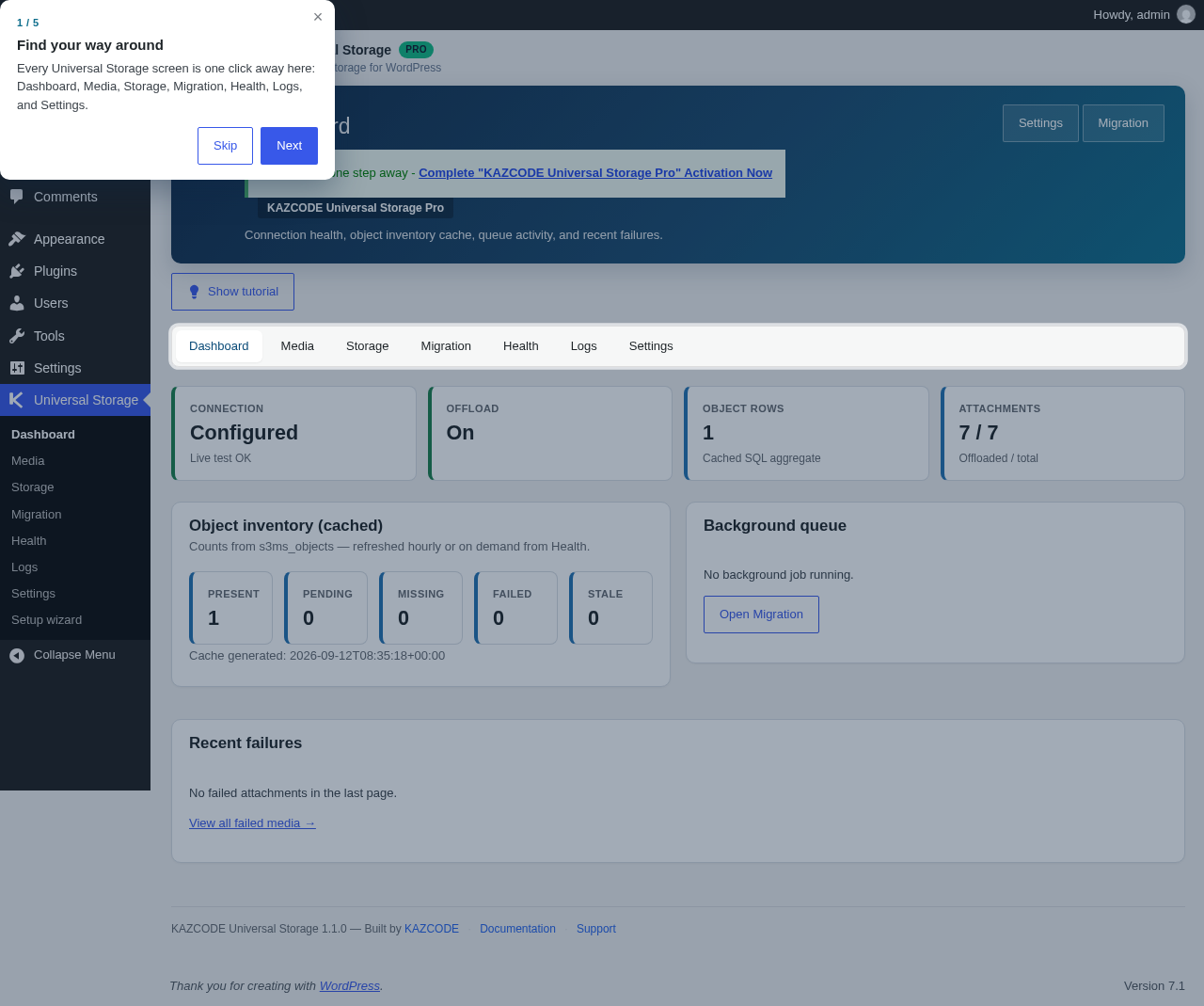
The Universal Storage Dashboard in wp-admin
Free
A complete, standalone product — not a trial.
- Automatic offload of new uploads and every generated image size
- Resumable multipart transfers for large files
- Restore media back to local disk on demand — nothing is one-way
- Repair: re-upload or re-verify individual objects without touching everything else
- Native Media Library integration — Grid/List, media modal, Featured Image, Gutenberg
- Import/adoption tools for WP Offload Media and Advanced Media Offloader
- Health checks, WP-CLI, REST API, and diagnostics
- One storage profile, no upload limits, no time limits — not a trial
Pro ADD-ON
A separate add-on for teams, agencies and advanced deployments that need multiple storage destinations and cross-provider operations.
- Multiple storage profiles, each with independent credentials
- Cross-provider / cross-bucket migration (e.g. Amazon S3 → Cloudflare R2)
- Resumable migration with verified destination cutover
- Optional source deletion after destination verification
- Orphan scan — dry-run only, reports, never deletes
- Advanced health and reconcile tools
- Multisite network defaults
KAZCODE Universal Storage Pro
Safe provider migration for professional WordPress sites.
Pro is a separate add-on — Free must remain installed and active. All Pro plans include the same feature set; plans differ only by the number of licensed sites. Billing is annual, and updates and support are included while your subscription is active.
What's included
- Multiple storage profiles
- Independent credentials per storage profile
- Cross-provider migration
- Cross-bucket migration
- Verify-before-switch migration
- Orphan object scan
- Advanced storage health and reconciliation
- WordPress Multisite network defaults
- Annual billing
- The same Pro features on every plan — plans differ only by licensed site count
- Secure checkout powered by Freemius
- 14-day money-back guarantee
- Updates and support included while your subscription is active
- KAZCODE Universal Storage Pro requires the Free plugin to remain installed and active
Your installed Pro functionality continues to work after subscription expiry; renewal is required for future updates and support.
Free vs Pro
Safety and data integrity are core capabilities in Free. Pro adds operational capabilities for multiple profiles, provider migration, and agency workflows.
| Capability | Free | Pro |
|---|---|---|
| Media offload | Included | Included |
| Restore from storage | Included | Included |
| S3-compatible providers | Included | Included |
| Multipart / resumable transfers | Included | Included |
| Core verification and safety checks | Included | Included |
| WP Offload Media import/adoption | Included | Included |
| Advanced Media Offloader import/adoption | Included | Included |
| Storage profiles | 1 primary profile | Multiple profiles |
| Provider-to-provider migration | — | Included |
| Verified destination cutover | — | Included |
| Optional safe source deletion | — | Included |
| Advanced health / orphan tools | Basic health | Advanced tools |
| Network / agency operation | Single-site operation | Multisite and agency-oriented tools |
Built to be trusted with your media
- WordPress remains the source of truth for every attachment
- Every generated image size is tracked and verified independently, not just the attachment as a whole
- Local files are only removed after a successful remote verification — there is no setting that skips this
- Restore, verify and basic repair are Free capabilities, never gated behind a paid upgrade
- Batch migrations resume from recorded attachment progress, so completed attachments do not need to be migrated again
- Cross-provider migration (Pro) verifies the destination before delivery ever switches to it
- No KAZCODE-owned media proxy and no telemetry in Free — the plugin only talks to the storage endpoint you configure
Frequently asked questions
Does it replace the WordPress Media Library?
No. WordPress keeps attachment posts, metadata, titles and alt text. Only the binary files — originals and every generated size — move to object storage.
Can I restore media back to WordPress?
Yes. Restore downloads files back into wp-content/uploads on demand. It is a Free capability and is never gated behind Pro.
Does it support Cloudflare R2?
Yes, alongside Amazon S3, DigitalOcean Spaces, Wasabi, Backblaze B2, MinIO, and other S3-compatible endpoints.
Can I migrate from Amazon S3 to Cloudflare R2?
Yes — cross-provider migration with verify-before-switch safety is a KAZCODE Universal Storage Pro capability.
Is Free a trial?
No. Free is a complete, standalone product — one storage profile, full offload/migrate/verify/restore, no upload or time limits.
What happens if I deactivate Pro?
Deactivating Pro never deletes data or breaks media that's already being served. Existing profiles, credentials and delivery keep working; only new premium operations become unavailable until reactivated.
Does KAZCODE receive my media files or credentials?
No. The plugin only connects to the storage endpoint you configure yourself. There is no telemetry, tracking, or phone-home to any KAZCODE-owned service.
How do I buy Universal Storage Pro?
Choose a Pro plan on the pricing section below. Checkout and license management are handled securely through Freemius.
Does Pro replace the Free plugin?
No. Pro is a separate add-on and requires Free to remain installed and active.
What happens if I do not renew?
Your installed Pro functionality continues to work; renewal is required for future updates and support.
Read the documentation
Installation, storage-provider setup, migration, restore, health, WP-CLI, and troubleshooting.
Open the docs